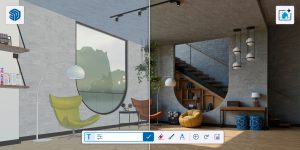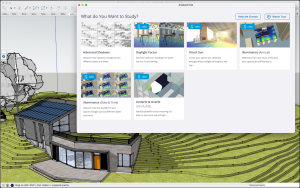
Winning a kitchen or bathroom project in South Africa increasingly comes down to one thing: the presentation. Clients spending R150,000 to R500,000 on a renovation don’t want to imagine what their space will look like — they want to see it. The designers who can show a photorealistic 3D walkthrough of the finished kitchen, with real cabinet colours, real appliance models and real tile patterns, are the ones signing contracts. This blog post looks at how South African kitchen and bathroom designers are using SketchUp to win more clients, reduce costly revisions and deliver better projects — through three practical, case-study-style scenarios drawn from real workflows we see across iRender’s customer base.
The Challenge: Why K&B Design Is Different
Kitchen and bathroom design sits at the intersection of architecture, interior design and cabinetmaking. The spaces are compact, every millimetre matters, and clients are deeply emotionally invested in the outcome. A 2D floor plan doesn’t convey enough. A mood board doesn’t prove it’ll actually fit. And revisions after installation are brutally expensive — you can’t move plumbing once the tiles are down.
South African K&B designers face additional pressure. Material costs are high. Clients are cautious about spending. And competition is fierce — from large kitchen franchise operations with glossy showrooms to one-person interior design practices working from home. The designers winning consistently are the ones who can present with confidence, answer “what if” questions in real time, and produce working drawings that the cabinetmaker, plumber and tiler can all trust.
That’s exactly where SketchUp earns its keep.
Case Study 1: The Boutique Kitchen Studio
Scenario: A two-person kitchen design studio in Johannesburg. They handle 15–20 kitchen projects per year, ranging from R120,000 galley kitchen refits to R450,000 open-plan kitchen-living spaces in Sandton and Bryanston.
The old workflow
The studio previously designed kitchens using a combination of 2D CAD software and hand-drawn elevations. Client presentations relied on material sample boards and printed catalogue pages. The designer would describe the layout verbally and hope the client could visualise it. Revisions were slow — each layout change meant redrawing plans and elevations from scratch. Misunderstandings between the designer and cabinetmaker led to costly errors on at least two projects a year.
The SketchUp workflow
After switching to SketchUp Pro, the studio’s process changed fundamentally:
- Site measure and setup. The designer measures the room on site and builds the shell in SketchUp — walls, windows, doors, floor and ceiling — to exact dimensions. This takes about 30 minutes for a standard kitchen.
- Cabinet layout. Using SketchUp components (either custom-built or downloaded from the 3D Warehouse), the designer places base cabinets, wall cabinets, tall units and island modules. Each cabinet is modelled to the actual dimensions offered by their preferred South African supplier. The work triangle is visible instantly — no guesswork about clearances or traffic flow.
- Appliance placement. Real appliance models from the 3D Warehouse — ovens, hobs, extractors, fridges, dishwashers — are dropped into the layout. The client sees the exact Smeg or Bosch model they’re considering, positioned precisely where it will go.
- Material presentation. Cabinet door colours, countertop textures, splashback tiles and floor finishes are applied directly to the 3D model. The designer can show three finish options — say, a white gloss kitchen, a sage green matt kitchen and a natural oak kitchen — in the same model by toggling between saved scenes. The client sees each option in context, not as an isolated swatch.
- Client walkthrough. The designer sets up scenes at eye height — standing at the sink looking toward the hob, entering from the dining room, opening the pantry — and walks the client through the space in 3D. Questions like “will I be able to see the TV from the island?” or “is there enough space to open the oven door and still walk past?” are answered visually, on the spot.
- Working drawings. Once the client approves, the designer uses LayOut to produce dimensioned elevation drawings, a cabinet schedule and an installation plan. The cabinetmaker, tiler and plumber all work from the same accurate set of documents.
The result
The studio reports that their close rate on initial consultations improved significantly after introducing 3D presentations. Revision cycles dropped because clients could see and approve the design before anything was built. Errors between design intent and workshop execution became rare because the cabinetmaker was working from precise, model-derived drawings rather than hand sketches.
Case Study 2: The Bathroom Renovation Specialist
Scenario: A solo interior designer in Cape Town specialising in bathroom renovations for older homes in the Southern Suburbs — Newlands, Claremont, Constantia. Projects range from R80,000 en-suite refreshes to R250,000 full bathroom redesigns with structural changes.
The challenge
Older Cape Town homes often have non-standard bathroom dimensions, uneven walls and unusual plumbing runs. Clients in this market are discerning — they want specific fixtures (often European brands), premium tile work and spa-quality finishes. They also want absolute certainty that the design will work in their specific space before any demolition begins.
The SketchUp workflow
- Accurate as-built model. The designer measures the existing bathroom meticulously — including ceiling heights, window positions, door swings and the location of existing plumbing connections. This is modelled in SketchUp to create a precise digital twin of the space.
- Fixture selection from 3D Warehouse. Bathroom fixtures from brands like Hansgrohe, Kohler and Duravit are available as verified manufacturer models on the 3D Warehouse. The designer downloads the exact basin, toilet, shower fitting and bath the client is considering and places them in the model. This immediately reveals whether the freestanding bath the client has her heart set on actually fits — and whether there’s enough clearance to use it comfortably.
- Tile layout planning. The designer applies tile textures to walls and floors, checking pattern alignment, grout line placement and how the tile meets fixtures and fittings. For feature walls with decorative tiles, the layout is planned precisely before a single tile is ordered — reducing waste and avoiding mid-project “we need three more boxes” surprises.
- Multiple design options. Using SketchUp’s Scenes and Tags, the designer prepares two or three design options in a single model — perhaps a contemporary option with large-format tiles and a wall-hung vanity, and a classic option with subway tiles and a freestanding basin. The client compares them side by side in 3D rather than trying to imagine the difference from flat images.
- V-Ray rendering for premium clients. For clients at the top end of the market, the designer uses SketchUp Studio’s built-in V-Ray to produce photorealistic renders — including accurate lighting, reflections on glass shower screens and water texture on tile surfaces. These renders are often indistinguishable from photographs and give the client complete confidence in the final result.
The result
The designer’s referral rate is exceptionally high. Clients share the 3D renders with friends and family, which generates new enquiries. The designer also reports that clients make faster decisions — seeing the design in 3D eliminates the uncertainty that causes weeks of deliberation. And because the plumber receives accurate, model-derived drawings showing exactly where each connection point should be, first-fix plumbing errors have been virtually eliminated.
Case Study 3: The Kitchen Franchise Partner
Scenario: A kitchen franchise outlet in Pretoria operating from a showroom in Menlyn. The franchise handles 40–50 kitchen installations per year across Gauteng, from entry-level townhouse kitchens (R80,000) to high-end estate kitchens (R600,000+).
The challenge
Franchise operations need consistency and speed. Multiple designers work from the same showroom, and every presentation needs to meet the franchise’s quality standards. The showroom has physical displays, but no physical kitchen can represent every combination of door profile, colour, countertop and handle. Clients also increasingly arrive with Pinterest boards and Instagram saves, expecting the designer to translate those images into a realistic design for their specific kitchen dimensions.
The SketchUp workflow
- Standardised component library. The franchise has built a custom SketchUp component library containing every cabinet module, door profile, handle, countertop edge detail and appliance they offer. New designers can start producing accurate kitchen models within days of joining because the components are pre-built and ready to assemble.
- Rapid design turnaround. A designer can model a complete kitchen layout — including appliances, finishes and accessories — within two to three hours using the standard component library. This means a client who visits the showroom on Saturday morning can receive a full 3D presentation by Monday.
- iPad presentations on site. Using SketchUp for iPad, designers can open and navigate the 3D kitchen model on a tablet during site visits. This lets the client stand in their own kitchen and compare the proposed design to their current space in real time. Changes to cabinet positions or finishes can be discussed on the spot.
- LayOut documentation for production. Once the design is signed off, LayOut generates the dimensioned drawings, cut lists and installation specifications that the franchise’s workshop needs to manufacture and install. Because the drawings are generated directly from the 3D model, they’re always consistent and accurate.
- Trimble Connect for collaboration. The designer shares the model to Trimble Connect so the client, the workshop manager and the installation team can all access the latest version. We covered Trimble Connect setup in a previous blog post.
The result
The franchise reports that showroom conversion rates improved after introducing SketchUp-based presentations. Clients who see their own kitchen modelled in 3D — with their chosen finishes, in their room dimensions — are far more likely to commit than clients shown generic catalogue images. Production errors dropped because the workshop works from model-derived drawings rather than hand-marked specification sheets. And designer onboarding time reduced because the standardised component library means new staff are productive quickly.
The Common Thread: What Makes SketchUp Work for K&B
Across all three scenarios, the same SketchUp capabilities drive the results:
- Speed. A complete kitchen or bathroom model can be built in two to four hours — fast enough to present at the next client meeting, not the next month.
- Accuracy. Models are built to real dimensions. What the client sees is what gets built.
- 3D Warehouse. Real appliance, fixture and fitting models from real manufacturers mean the presentation shows actual products, not generic placeholders.
- Material application. Clients see finishes in context — on the cabinets, on the walls, on the floor — not as isolated swatches on a sample board.
- Multiple options. Scenes and Tags make it trivial to show two or three design directions in a single meeting.
- LayOut documentation. Working drawings are generated from the same model the client approved, eliminating the gap between design and production.
- Client confidence. When a client can walk through their future kitchen or bathroom in 3D, the sale becomes a conversation about finishes and timing — not a leap of faith.
Extensions That Help
Several SketchUp extensions are particularly useful for K&B work:
- CabMaker — generates parametric kitchen cabinets with selectable door styles, hardware and dimensions. Changes are made by adjusting parameters rather than remodelling from scratch.
- Profile Builder — creates mouldings, skirting boards, cornices and other linear details quickly and accurately.
- Curic Section — generates clean section cuts through the model for elevation drawings and detail views.
- V-Ray (included in SketchUp Studio) — produces photorealistic renders with accurate lighting, reflections and material properties. The 2026 release adds photography-style exposure controls for even more realistic output.
All of these are available through the SketchUp Extension Warehouse or directly from their developers.
Getting Started: Which SketchUp Subscription for K&B Design?
| Subscription | Price (excl. VAT) | Best for |
|---|---|---|
| SketchUp Pro | R6,900/year | Solo designers and small studios. Full desktop modeller, LayOut documentation, 3D Warehouse, extensions, iPad and web access. Everything you need to model, present and produce working drawings. |
| SketchUp Studio | R13,900/year | Designers who need photorealistic V-Ray renders for premium client presentations. Read our Pro vs Studio comparison to decide if the upgrade makes sense for your practice. |
| SketchUp Go | R2,300/year | Entry-level or supplementary use. Browser-based and iPad modelling for on-site reviews and quick concept sketches. |
All prices from iRender’s 2026 catalogue. Prices exclude VAT (15%) and are subject to change.
Win More Kitchen and Bathroom Projects with SketchUp
Whether you’re a solo bathroom specialist, a boutique kitchen studio or a multi-designer franchise operation, SketchUp gives you the tools to present with confidence, reduce costly errors and close projects faster. When you buy through iRender, you get:
- ZAR billing — no exchange rate surprises or credit card forex fees.
- Local support — real human help in your time zone.
- Personalised training — including K&B-specific workflow guidance.
- Honest advice — we’ll recommend the subscription that fits your practice, not the most expensive one.
Ready to start presenting kitchens and bathrooms in 3D?
Learn more about SketchUp for Kitchen & Bathroom Design
Start your free SketchUp trial
Or get in touch for a personalised recommendation:
athol@irender.co.za | +27 (0)82 468 0937
iRender (Pty) Ltd | Certified SketchUp Gold Reseller | Centurion, South Africa
Call: +27 (0)82 468 0937 | Email: athol@irender.co.za | Web: www.irender.co.za
Frequently Asked Questions
Q: Can SketchUp model fitted kitchen cabinets to exact dimensions?
A: Yes. SketchUp Pro models cabinetry to precise millimetre dimensions. You can build custom cabinet components or use extensions like CabMaker to generate parametric cabinets with selectable door profiles, hardware and finishes. The 3D Warehouse also contains thousands of free cabinet and appliance models from real manufacturers.
Q: Is SketchUp better than dedicated kitchen design software?
A: SketchUp Pro offers far more flexibility than dedicated kitchen CAD tools. It handles any room shape, complex angles and unusual layouts without limitation. It also covers all interior design work — not just kitchens — and produces higher-quality 3D presentations. Extensions like CabMaker add kitchen-specific functionality when you need it.
Q: Can I produce photorealistic renders of kitchens and bathrooms?
A: Yes. SketchUp Studio includes V-Ray 7, one of the world’s leading rendering engines. V-Ray produces photorealistic imagery with accurate lighting, reflections and material properties — ideal for premium client presentations. If you don’t need photorealistic rendering, SketchUp Pro’s built-in styles and AI Render tools produce polished, professional presentations at a lower cost.
Q: How do I find real appliance and fixture models for my SketchUp kitchen or bathroom?
A: The 3D Warehouse contains verified product models from hundreds of manufacturers including Kohler, Hansgrohe, Blum and many more. You can search by brand, product type or even by uploading a reference image using AI-powered Image Search. Many products available through South African distributors are represented in the library.
Q: Where can I buy SketchUp for kitchen and bathroom design in South Africa?
A: iRender (irender.co.za) is South Africa’s certified SketchUp Gold Reseller. All subscriptions are invoiced in ZAR with VAT-compliant tax invoices and include local support. Contact Athol at athol@irender.co.za or call +27 (0)82 468 0937 for a personalised recommendation.