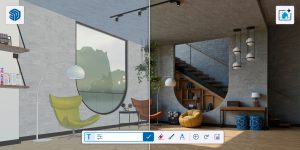
AI Render takes a major leap forward with Nano Banana — Google’s state-of-the-art image-generation model — bringing a dramatic jump in realism to both interior and exterior visualisation inside SketchUp. Generated images now accurately reflect your original SketchUp camera view, geometry, and material details, so the render you get back is the scene you designed, not an AI’s reinterpretation of it.
For South African architects, interior designers, and 3D professionals, this changes the economics of presentation work. You can achieve client-ready visuals out of the gate, then refine them using simple text prompts — adjusting lighting, swapping materials, or fine-tuning environmental detail — and get hyper-realistic results in seconds, without a render farm or a high-end workstation working overtime.
What’s new in AI Render with Nano Banana
The Nano Banana upgrade addresses the single biggest frustration designers have had with AI rendering: results that look impressive but drift away from the actual model. Here’s what changes:
- True-to-model geometry: Generated images follow your SketchUp geometry rather than inventing new shapes, walls, or openings.
- Camera-view accuracy: The output respects your original camera angle and composition, so what you framed in SketchUp is what you present.
- Material fidelity: Textures and material details from your model carry through into the render, keeping finishes consistent with your specification.
- Dramatically improved realism: Lighting, reflections, and surface detail land at a hyper-realistic level suitable for client sign-off.
- Prompt-based refinement: Once you have a base image, plain-language prompts let you iterate in seconds instead of re-rendering from scratch.
Why this matters for South African designers
Local studios work under real constraints — tight client turnarounds, hardware that has to last, and the ongoing cost of render-heavy workflows. AI Render with Nano Banana eases all three:
- Speed where it counts: A concept-to-presentation visual in seconds means you can respond to a client the same day, not the next.
- Lighter on hardware: Because the heavy lifting happens in the AI model, you are far less dependent on a high-spec GPU to produce a polished image.
- Fewer tools to licence: Strong base visuals from inside SketchUp reduce the round-trips to separate render engines and post-production software for everyday presentation work.
- Faster iteration in client meetings: Change a material or the time of day with a text prompt while the client watches, rather than booking another render cycle.
How it fits your SketchUp workflow
AI Render runs as an extension inside SketchUp, so it slots into the way you already work. A typical pass looks like this:
1. Set up your scene
Model and frame your view in SketchUp exactly as you want it presented. Because Nano Banana respects your camera and geometry, the composition you set here is the composition you get back.
2. Generate a base render
Run AI Render to produce a hyper-realistic first image. For most interior and exterior scenes this is already at a standard you could put in front of a client.
3. Refine with text prompts
Dial in the mood without leaving the workflow — for example, warmer afternoon light, a different floor finish, or richer planting outside the window. Each prompt returns an updated visual in seconds, so you can explore several directions in the time a traditional engine would take to render once.
Interior and exterior, out of the gate
The realism gains apply across the board. Interior scenes benefit from believable bounced light, accurate material reads, and natural shadowing; exterior scenes gain convincing skies, landscaping, and environmental context. The result is a consistent, presentation-grade look whether you are visualising a living space, a façade, or a full site.
AI Render with Nano Banana vs a traditional render engine
AI Render is built for speed and iteration. A traditional engine still has its place for final hero shots where you need absolute control over every light and material. Here’s how they compare for day-to-day work:
| AI Render with Nano Banana | Traditional render engine | |
|---|---|---|
| Time to first visual | Seconds | Minutes to hours |
| Hardware demand | Low — AI does the work | High — GPU/CPU intensive |
| Geometry & camera accuracy | Follows your SketchUp view | Exact, but manually set up |
| Refining a change | Plain-text prompt | Manual material & lighting edits |
| Learning curve | Minimal | Moderate to steep |
| Best suited to | Fast concepts, client presentations, quick iterations | Final hero shots needing full control |
For most South African practices, the two are complementary: AI Render handles the volume of everyday presentation work, while a full engine is reserved for the occasional flagship image.
Get started with SketchUp and AI Render in South Africa
AI Render is a SketchUp extension, so you’ll need an active SketchUp subscription to put Nano Banana to work. As South Africa’s certified SketchUp Gold Reseller, iRender supplies every tier — Go, Pro, Studio, and ADV Workflow — with local support and ZAR billing, so you’re never tied to USD pricing or overseas support hours.
- Local SA support from Centurion, Gauteng — a real person in your time zone
- VAT-compliant tax invoices, billed in ZAR
- Help choosing the right tier for your rendering and modelling workflow
SketchUp Pro 2026 from R6,700/year (excl. VAT). Pricing is subject to exchange-rate variance.
Download a free 7-day trial of any tier at www.irender.co.za
Call Athol on +27 (0)82 468 0937 for a personalised recommendation
Email athol@irender.co.za for a formal quote with ZAR pricing
iRender (Pty) Ltd | Certified SketchUp Gold Reseller | Centurion, South Africa
Call: +27 (0)82 468 0937 | Email: athol@irender.co.za | Web: www.irender.co.za
Frequently asked questions
What is Nano Banana in AI Render?
Nano Banana is Google’s advanced image-generation model, now powering AI Render. It produces photorealistic interior and exterior visuals that stay true to your SketchUp camera view, geometry, and material details, rather than reinterpreting your design.
Do I need a powerful PC or a separate render engine?
No. Because generation happens through the AI model, you get hyper-realistic results in seconds without long local render times or a high-end render setup — making it well suited to studios that want polished visuals without heavy hardware.
Does AI Render work for both interior and exterior visualisation?
Yes. The Nano Banana upgrade improves realism across both, from interior lighting and materials to exterior skies, landscaping, and environmental context.
Can I change the result after it generates?
Yes. You refine the image with simple text prompts — adjusting lighting, swapping materials, or fine-tuning environmental detail — and each change returns an updated visual in seconds.
Do I need a SketchUp subscription to use AI Render?
Yes. AI Render is a SketchUp extension, so an active SketchUp subscription is required. iRender supplies all SketchUp subscriptions in South Africa with ZAR invoicing and local support.
Where can I buy SketchUp in South Africa with ZAR invoicing?
iRender (irender.co.za) is South Africa’s certified SketchUp Gold Reseller. All subscriptions are invoiced in ZAR with VAT-compliant tax invoices and include local support from Centurion, Gauteng.